I’m gonna to be upfront with you: I am not good at writing titles (set stats at the bottom of this article). My default is to take the keyword, clean it up slightly, and use that. “How to Water a Pothos.” “Why Are My Pothos Leaves Turning Yellow.” Done.
That approach is not wrong — your keyword in the title is non-negotiable, and a clear, descriptive title will always beat a clever one that obscures what the post is actually about. But it’s also not ideal. A keyword-as-title is functional. A good title is functional and makes someone think “yes, that’s exactly what I need” before they’ve read a word.
The title is the single line that decides whether anyone clicks on your post in search results. After everything — the keyword research, the structure, the writing — it comes down to this one line. It deserves more than thirty seconds of thought at the end of the process.
What a blog post title actually is
Your blog post title is your H1 — the main heading at the top of the page. It’s also what Google shows as the clickable link in search results. Those two things are related but not identical, and the distinction matters (more on that shortly).
The title has to do several jobs simultaneously:
- Contain your primary keyword, ideally near the front
- Tell the reader what they’ll get from the post
- Be under 60 characters so it doesn’t get cut off in search results
- Be specific enough to be useful, broad enough to be interesting
That last one is where most titles fail. Too specific and it sounds dry. Too broad and it tells the reader nothing. The sweet spot is a title that answers “what’s in it for me?” without being so vague it could mean anything.
The 60-character rule
Google truncates titles that are too long in search results, replacing the end with “…” This isn’t a ranking penalty — it doesn’t hurt your position — but it does hurt click-through rate. A reader who can’t see the full title gets less information to decide whether to click.
Keep your title under 60 characters. RankMath will flag it if you go over, which is a useful check — but count it yourself before you rely on the tool.
A few examples of the same title at different lengths:
- “How to Propagate Pothos” — 23 characters. Clear, keyword-first, nothing wasted.
- “How to Propagate Pothos in Water: A Complete Step-by-Step Guide” — 63 characters. Gets truncated. “A Complete Step-by-Step Guide” adds length without adding information.
- “Everything You Need to Know About Propagating Pothos Plants in Water” — 68 characters. Loses the keyword from the front and still gets truncated.
Shorter is almost always better. If your title needs to be long to say what it needs to say, that’s usually a sign it’s trying to say too much.
Title formulas that work
Rather than starting from scratch every time, use a formula as a starting point and fill it in for your keyword. These work because they’ve been tested across millions of searches — they match the patterns people recognise as useful.
| Formula | Example |
|---|---|
| How to [do X] | How to Propagate Pothos |
| How to [do X] Without [undesirable thing] | How to Repot Pothos Without Killing It |
| Why [X] Is [Y] (And What to Do About It) | Why Your Pothos Leaves Are Turning Yellow (And How to Fix It) |
| [Number] Ways to [achieve desirable outcome] | 5 Ways to Make Your Pothos Grow Faster |
| [X]: The Beginner’s Guide | Pothos Care: The Beginner’s Guide |
| Is [X] Worth It? | Are Self-Watering Pots Worth It for Pothos? |
| [X] vs [Y]: Which Is Better? | Soil vs LECA for Pothos: Which Is Better? |
| The [adjective] Guide to [X] | The Honest Guide to Pothos Fertiliser |
| What Nobody Tells You About [X] | What Nobody Tells You About Pothos Propagation |
| [X]: Signs, Causes and Fixes | Overwatered Pothos: Signs, Causes and Fixes |
A note on numbers: odd numbers in titles (“5 Ways” rather than “6 Ways”) tend to perform slightly better in click-through tests, possibly because they feel less rounded-up. It’s a small effect and not worth contorting a title for — but if you’re choosing between five and six items, that’s a mild reason to pick five.
The 10 titles method
When I have a post I particularly want to perform well, I write ten possible titles before choosing one. This sounds tedious. It takes about eight minutes and it’s worth it.
The first two or three titles are usually just the keyword in different arrangements. By title five or six you start getting somewhere more interesting. By title nine or ten you’re sometimes writing the one you actually want.
The process works because it forces you past the obvious first answer — which is usually “keyword plus filler” — into territory where you’re actually thinking about what makes this specific post worth clicking on. What does the reader get? What problem does it solve? What’s the angle that makes it different from the other results?
You don’t have to use any of the ten. Sometimes the exercise just clarifies what the post is actually about, and the right title becomes obvious once you’ve worked through the options.
The keyword still comes first
All of this is in service of a title that contains your primary keyword, naturally, as close to the front as possible.
“How to Propagate Pothos in Water” has the keyword near the front. “A Complete Guide to the Different Methods of Propagating Your Pothos Plant” buries it. The first will perform better in search regardless of which sounds more impressive.
This isn’t about keyword stuffing — it’s about matching the pattern Google expects and the reader recognises. When someone searches “how to propagate pothos” and sees “How to Propagate Pothos in Water” in the results, the match is immediate and obvious. That’s what drives the click.
Avoid the temptation to be clever at the expense of clarity. A title like “From Cutting to Plant: The Pothos Propagation Journey” is more creative than “How to Propagate Pothos” and will get fewer clicks, because the searcher has to work out whether it’s what they were looking for.
Avoid clickbait — it backfires
Clickbait titles overpromise what the content delivers. “This One Pothos Trick Will Change Your Life” sets an expectation the post almost certainly can’t meet. The reader clicks, realises within fifteen seconds that it won’t change their life, and leaves.
That bounce is a signal to Google. Enough of them and your ranking drops — which defeats the entire point of writing a clickable title in the first place.
The test for clickbait is simple: does your title accurately describe what the post contains? If you have to stretch to justify the title against the content, rewrite the title.
Specificity is usually the cure. “This One Pothos Trick Will Change Your Life” is vague and overblown. “Why Wiping Pothos Leaves Actually Makes a Difference” is specific, makes a claim, and delivers on it. The second is more interesting than a plain keyword title without making a promise the post can’t keep.
The slug and H1 don’t have to match
This is something most blogging guides don’t mention and it’s one of the most practically useful things to know.
Your URL slug and your H1 title are separate fields in WordPress. You set the slug when you create the post — WordPress generates it automatically from your title, but you can edit it independently. Once it’s set and the post is published, you generally don’t want to change the slug (it breaks links and loses any SEO value the URL has built up). But you can change the H1 title as many times as you like without affecting the URL.
What this means in practice: you can test and update your titles freely after publishing. If a post isn’t getting the click-through rate you’d hoped for, try a different title. Change “How to Propagate Pothos” to “How to Propagate Pothos in Water (3 Methods That Actually Work)” and see if the click-through rate improves in Google Search Console.
Keep your slug clean and keyword-focused from the start — short, hyphens between words, no filler. Set it once and leave it. Your title, on the other hand, can evolve.
A quick checklist for every title
Before you finalise any title, run through these:
- Does it contain the primary keyword, near the front?
- Is it under 60 characters?
- Does it clearly tell the reader what they’ll get from the post?
- Does it accurately represent what the post actually contains?
- Does it match the intent — informational, commercial, or something else?
- Would you click it if you saw it in search results?
That last one is the real test. If you wouldn’t click it, your reader probably won’t either.
Frequently asked questions
What makes a good blog post title?
A good blog post title contains your primary keyword near the front, is under 60 characters, clearly tells the reader what they’ll get from the post, and accurately represents the content. It should match the search intent — someone searching an informational query wants a title that signals information, not a sales pitch.
Should my blog post title include keywords?
Yes — your primary keyword should appear in your title, as close to the front as possible. This is one of the clearest signals to Google about what your post covers, and it helps readers immediately confirm they’ve found what they were searching for.
How long should a blog post title be?
Under 60 characters. Google truncates longer titles in search results, which reduces the information available to the reader and can hurt click-through rate. Count your characters before publishing — RankMath will also flag titles that are too long.
Can I change my blog post title after publishing?
Yes. Your H1 title and your URL slug are separate. You can update the title as many times as you like after publishing without affecting the URL. Avoid changing the slug after publishing — it breaks existing links and loses any SEO value the URL has accumulated.
What are some good blog post title formulas?
Reliable formulas include: “How to [X]”, “How to [X] Without [undesirable thing]”, “Why [X] Is [Y] (And What to Do About It)”, “[Number] Ways to [outcome]”, “[X] vs [Y]: Which Is Better?”, and “What Nobody Tells You About [X]”. Use them as starting points — fill in the keyword and adjust to fit the specific angle of your post.
Is clickbait bad for SEO?
Yes, because it produces high bounce rates. If your title overpromises and the content underdelivers, readers leave quickly. Google interprets that as a signal that the post didn’t satisfy the search, which pushes rankings down. A specific, accurate title that delivers on its promise will outperform clickbait over time.
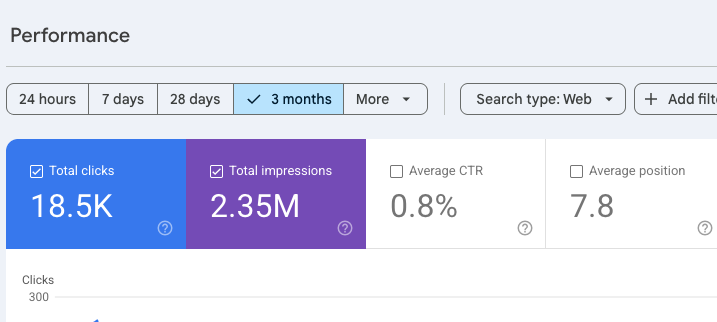
Remember I said I was bad at titles? Here’s the proof, in the form of my dismal click through rate from Planet Houseplant:
What to read next
Your title and meta description work as a pair — the title catches the eye in search results, the meta description closes the click. Article 27: How to Write a Blog Post That Ranks on Google covers meta descriptions as part of the full on-page optimisation process.